
Time Allocation is a specific Uplevel insight that provides an automated, up-to-date breakdown of where your organization’s time and efforts are spent. As a pivotal lens for engineering organizations today, Uplevel’s Time Allocation empowers engineering leadership with the right visibility to proactively align efforts to strategic business priorities and systematically inform tax capitalization reporting, all while saving your teams from manual, heavy lifting on a regular basis to try to compile this on their own.
Uplevel’s Time Allocation has been rigorously evaluated and audited for the purposes of tax capitalization reporting, and has passed each test due to the way in which Uplevel overlays metadata from each data source.
Uplevel references each developer’s calendar to discern time spent in Meetings and Out-of-Office vs. available time on the calendar. Uplevel then intelligently captures the amount of Chat Interruptions each developer has for each day. The remaining time outside of Meetings, Out-of-Office, and Interruptions, is classified as Available Dev Time.
With the Available Dev Time, Uplevel then aggregates all the activity from Jira, Git, and Incident Management to identify engineering time and efforts spent on various Epics, Projects, Issue Types and more. Beyond simply looking at PR activity at the repo level, Uplevel intelligently links PRs to the respective Jira work to provide an enhanced view of where time is spent.
Uplevel looks a distribution of activity (the space between timestamps) as a portion of the entire working day. Then we apply that same percentage of available working time as the allocation.
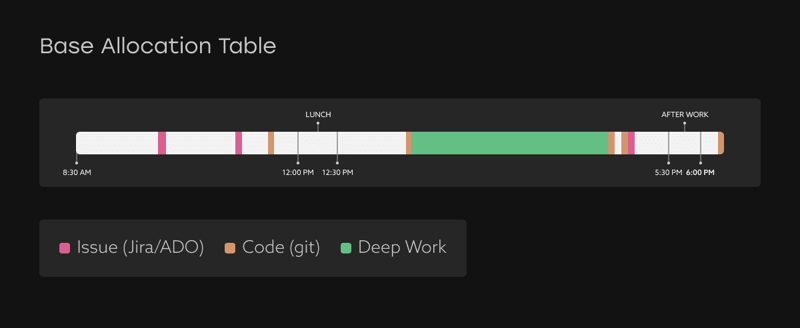
For example, imagine the green bar of work time above is 35% of the distribution. We’ve calculated that this person had 5.75 hours of available work time this day, so this stretch of time should get 35% of that 5.75 hours, or 2 hours, which is then allocated to the activity at the end of that block.
No process change or additional work is required of your teams in order to capture Time Allocation. However, Uplevel can also custom build Time Allocation based on existing Jira data to map to how your teams organize their work. Examples of custom aggregations include using custom Jira fields, parent link mappings, or even a custom rule (e.g. Project 47 + Bug Issue Types = KTLO).For example, Uplevel maps all of our engineering work using a hierarchy in Jira. "Initiative" represents larger bodies of work and is captured via a required field on Jira Epics. We plan our initiatives on a quarterly basis and are then able to track alignment to the plans ongoing throughout a quarter with Time Allocation.
%20(1).png?width=600&height=424&name=Jira%20Hierarchies%20(1)%20(1).png)
💡 Tip: Uplevel has many best practices to help you operationalize a new custom Jira field. Many Uplevel customers have implemented this as a new process, which Uplevel can help expedite by surfacing the work not linked or tagged according to the standard being used.
If Uplevel doesn’t see any signals from Jira, Git, or Incident Management activity on a given day, Uplevel will sequentially look at the previous 6 days to see what Jira issues, PRs, and Incidents may still be open or being worked on. Activity is distributed across work items using story points.
If Uplevel sees no open Jira issue assigned to an individual on a given day (that is actively being worked on with activity in the last 7 days) or linked GitHub activity in the last 14 days, then Uplevel categorizes that Available Dev Time as Other efforts (aka. No Issue or PR activity), as Uplevel estimates that the developer is working in tools not captured by Uplevel on that day (e.g. documentation, Miro, etc.)
💡Example: Lisa is a developer and Uplevel sees no Jira, Git, or Incident Management activity for Tuesday. However, Uplevel sees that Lisa has an open Jira ticket with an associated PR authored on Monday and the PR is still open on Tuesday. Uplevel estimates that Lisa is still working on that PR/Ticket.
Uplevel's Time Allocation report offers a high level view of how teams are spending their time spread across various initiatives and projects.
This view offers several alternate ways of reporting time spent in each area.