
Quickly see the state of Always On at your organization and take action.
Long working hours are important to track — teams might be churning out code, but at what cost? Too much work, week over week without reprieve, can lead to unhappy developers and ultimately to attrition.
Sustained Always On is calculated by looking across all of the signals Uplevel has for a given contributor each day. Each activity is assigned a weight, for example, a 30 minute meeting gets 30 minutes of "weight".
Uplevel assumes that the 8 hours with the most activity "weight" are the given contributor's "working hours" for the given day. A contributors "working hours" may change day-to-day as the inputs to their activity weights change.
Anything beyond those assumed "working hours" are classified as "always on" time.
Use this chart to understand your Always On trends over time. Levels of Sustained Always On are categorized into Elevated and High.
Drill down to see what percentage of each team (the number of individuals) have been at each level of Sustained Always On activity over the selected time frame. Teams with high value have had more individual at a elevated level, for a longer duration of time.
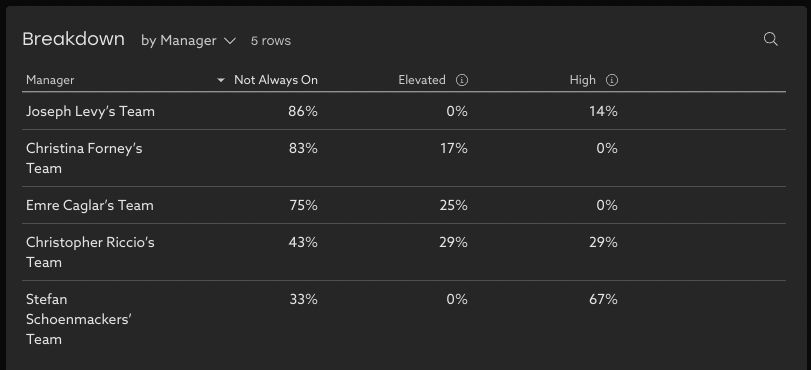
Always On data is vailable at the individual level, complementing the same details about Deep Work and Meeting categories in order to give a complete picture of teams' working habits.
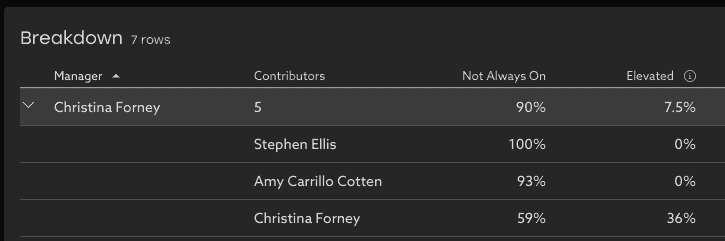
By default, information at the individual level is provided only to those in the reporting tree - who have context to interpret the data and help support the team.
Specifically, this detail is available to the individual themselves, and their manager and leaders who they report up to. Individual level details are not available about individuals outside your reporting tree who don't report up to you.